Auto Piano Player v0.0.1
By TamKungZ_
Description
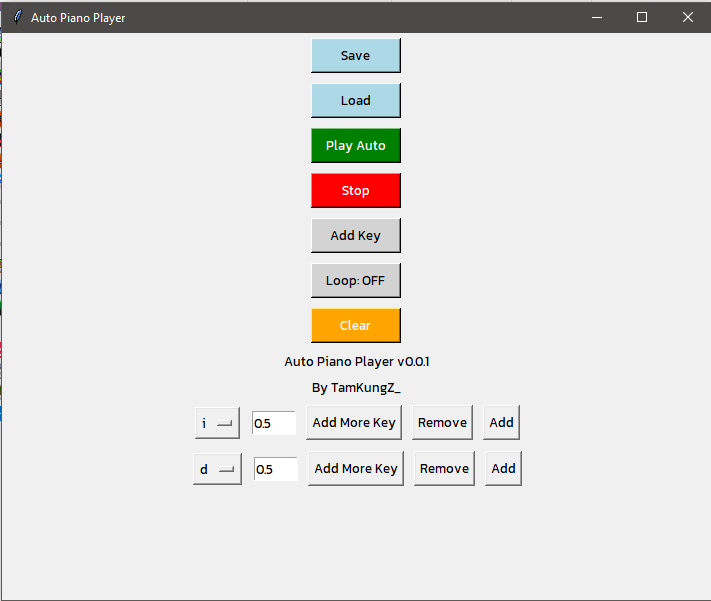
Auto Piano Player is a Python-based tool designed to automate keypress sequences for playing virtual pianos. It allows users to easily configure key presses and delays between them, with additional features like looping, adding multiple keys per sequence, and saving/loading configurations from a JSON file.
<p align=“center”> <img src=“https://github.com/user-attachments/assets/f002a78f-b3c4-4253-9bfc-03b14a2c9cb3” width=“300”/> <img src=“https://github.com/user-attachments/assets/be244527-4522-400d-8a9e-b0c66693a6de” width=“250”/> </p>
Features
- Add multiple keys: Allows you to add multiple keys to be played together.
- Loop function: Play key sequences in a loop.
- JSON save/load: Save your key configurations and load them when needed.
- Hotkey support: Activate the auto-play using
Ctrl+Shift+P. - Clear all keys: Easily clear all added keys with one click.
- On-screen control: Simple, user-friendly interface with buttons to start, stop, add keys, and toggle looping.
Requirements
- Python 3.x
- Libraries:
- tkinter
- pynput
- keyboard
Installation
- Clone or download this repository.
- Install the required Python libraries:
pip install pynput keyboard - Run the application:
python AutoPianoPlayer.py
Usage
- Use the “Add Key” button to add keypresses and delays.
- Configure the play settings, including loop mode.
- Press “Play Auto” to start the automatic keypress sequence, and “Stop” to halt it.
- Use the “Save” and “Load” buttons to save your settings in a JSON file.
- Use “Clear” to reset all key entries.