 tarball → desktop app installer for Linux, by TamKungZ_
A small, honest tarball installer








Instead of asking people to extract a .tar.xz somewhere and run a random binary by hand, Tarminal installs the app into a standard location, creates a command, a desktop menu entry and an icon, tracks what it installed, and removes it cleanly later.
The project is split into two Cargo packages: tar-install, a reusable library, and tarminal, the CLI frontend built on top of it. If someone runs the bare tar-install binary directly, it just points them at tarminal.
Written in Rust, MIT licensed, maintained by TamKungZ_. The reusable core is published as the tar-install Rust crate and Python bindings for tools that want to build on the installer directly.
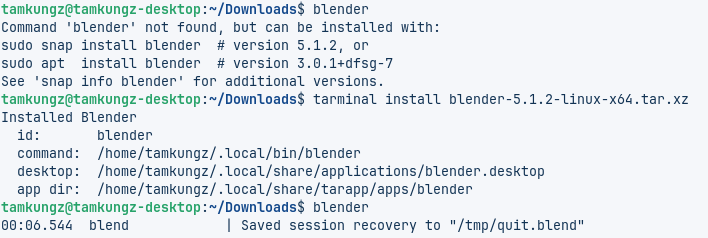
Install Tarminal
Debian / Ubuntu / Zorin
curl -fsSL https://packages.tamkungz.me/gpg.key | \
  sudo gpg --dearmor -o /usr/share/keyrings/tamkungz-packages.gpg

echo "deb [arch=amd64 signed-by=/usr/share/keyrings/tamkungz-packages.gpg] https://packages.tamkungz.me/apt stable main" | \
  sudo tee /etc/apt/sources.list.d/tamkungz-packages.list

sudo apt update
sudo apt install tarminal
sudo add-apt-repository ppa:tamkungz/stable
sudo apt update
sudo apt install tarminal
Fedora / RPM
sudo tee /etc/yum.repos.d/tamkungz-packages.repo >/dev/null <<'EOF'
[tamkungz-packages]
name=TamKungZ Packages
baseurl=https://packages.tamkungz.me/rpm/$basearch/
enabled=1
gpgcheck=0
repo_gpgcheck=1
gpgkey=https://packages.tamkungz.me/gpg.key
EOF

sudo dnf makecache
sudo dnf install tarminal
gpgcheck=0 is used for now — repo metadata is signed, RPM package signing is on the way.openSUSE Tumbleweed
sudo zypper ar https://download.opensuse.org/repositories/home:/TamKungZ_/openSUSE_Tumbleweed/home:TamKungZ_.repo
sudo zypper refresh
sudo zypper install tarminal
Alpine (APK)
sudo mkdir -p /etc/apk/keys
curl -fsSL https://packages.tamkungz.me/apk/tamkungz.rsa.pub | \
  sudo tee /etc/apk/keys/tamkungz.rsa.pub >/dev/null

echo "https://packages.tamkungz.me/apk" | \
  sudo tee -a /etc/apk/repositories

sudo apk update
sudo apk add tarminal
Void Linux (XBPS)
sudo mkdir -p /etc/xbps.d
sudo tee /etc/xbps.d/tamkungz.conf >/dev/null <<'EOF'
repository=https://packages.tamkungz.me/xbps/$XBPS_ARCH
EOF

sudo xbps-install -S
sudo xbps-install tarminal
Arch Linux (pacman)
curl -fsSL https://packages.tamkungz.me/gpg.key | sudo pacman-key --add -
sudo pacman-key --lsign-key release@tamkungz.me || true

sudo tee -a /etc/pacman.conf >/dev/null <<'EOF'
[tamkungz]
Server = https://packages.tamkungz.me/arch/$arch
SigLevel = DatabaseRequired PackageOptional
EOF

sudo pacman -Sy
sudo pacman -S tarminal
Published Packages — v0.2.0
| Package | Format | Channel |
|---|---|---|
| tarminal_0.2.0-1_amd64.deb | Debian / Ubuntu | /apt |
| tarminal-0.2.0-1.x86_64.rpm | Fedora / RPM | /rpm/x86_64 |
| tarminal | openSUSE Tumbleweed | OBS |
| tarminal-0.2.0-r0.apk | Alpine APK | /apk |
| tarminal-0.2.0-0-x86_64.pkg.tar.zst | Arch pacman | /arch/x86_64 |
| tarminal-0.2.0_1.x86_64.xbps | Void XBPS | /xbps/x86_64 |
| tar-install | Rust crate / Python package | crates.io / PyPI |
GitHub Releases also publish standalone Linux binaries, .deb, .rpm, .tar.xz, SHA256SUMS, and detached .asc signatures. Full list on GitHub Releases →
Developer Packages
- Rust crate: use the installer core directly from Rust applications.
- Python bindings: reuse the shared library from Python tools.
Usage
# Inspect tarball
tarminal inspect ./myapp-1.2.0-linux-x64.tar.xz

# Install with automatic detection
tarminal install ./myapp.tar.xz

# Manual config prompts
tarminal install ./app.tar.xz --config

# Use a recipe file
tarminal install ./app.tar.xz --recipe ./app.tarapp.yml

# System-wide install
sudo tarminal install ./app.tar.xz --system

# List installed apps (shows 'unknown' if no reliable version found)
tarminal list

# Remove an app
tarminal remove myapp

# Check installed app
tarminal doctor myapp
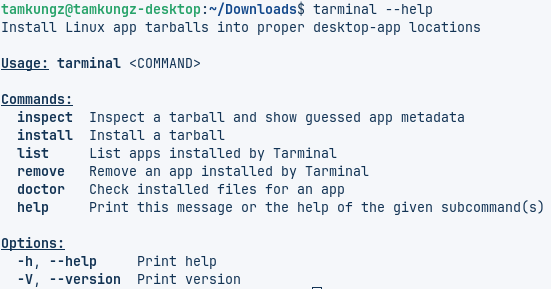
tarminal --helpInstallation Paths
User install
App files:   ~/.local/share/tarapp/apps/<app-id>/
Command:     ~/.local/bin/<command>
Desktop:     ~/.local/share/applications/<app-id>.desktop
Icon:        ~/.local/share/icons/hicolor/256x256/apps/<app-id>.*
State DB:    ~/.local/state/tarapp/apps.json
System install
App files:   /opt/<app-id>/
Command:     /usr/local/bin/<command>
Desktop:     /usr/share/applications/<app-id>.desktop
Icon:        /usr/share/icons/hicolor/256x256/apps/<app-id>.*
State DB:    /var/lib/tarapp/apps.json
Supported Archives & Detection
Archive formats: .tar.xz, .txz, .tar.gz, .tgz, .tar.bz2, .tbz2, .tar
Filename detection
Tarminal first tries to infer app metadata from common filename shapes:
<app>-<version>-<os>-<architecture>.tar.xz
<app>_<version>_<os>_<architecture>.tar.xz
Executable detection
It then inspects the archive contents and looks for likely executable candidates, including names that match:
<app>
<app>-<architecture>
<app>_<architecture>
bin/<app>
If detection isn't good enough for a given tarball, fall back to tarminal install ./app.tar.xz --config or provide a recipe (below).
Detection fallback
- user-provided CLI / config / recipe version
- reliable archive filename parsing
- app metadata inside the installed directory (
product-info.json,package.json,VERSION, etc.) - runtime command probing (
--version,-version,-v,version,-V) unknown/Noneif nothing reliable was found
--config or provide a recipe.Recipe Format
External: --recipe ./app.tarapp.yml | Embedded (inside the archive): tarapp.yml, tarapp.yaml, .tarapp.yml, .tarapp.yaml, manifest.yml, manifest.yaml
id: com.example.myapp
name: My App
version: 1.0.0
exec: MyApp
command: myapp
icon: assets/icon.png
desktop:
  categories:
    - Utility
  terminal: false
Recipes are optional, but they are the recommended way for communities or app authors to make tarball installs reliable.
Build From Source
cargo build --workspace
cargo build --release -p tar-install --bin tar-install
cargo build --release -p tarminal
Rust workspace — tar-install library + tarminal CLI frontend.
Safety Behavior
Tarminal refuses to install archives with unsafe entries, regardless of recipe or CLI flags:
- absolute paths
..path traversal- unsafe or absolute symlink targets
- hard-link entries (still unsupported)
Relative symlinks are allowed only when they resolve inside the extracted app tree. Anything that points outside the app tree is rejected.
Package Locally
Install the packaging tools once:
cargo install cargo-deb cargo-generate-rpm
Build .deb
cargo deb -p tar-install
cargo deb -p tarminal
Build .rpm
cargo build --release -p tar-install --bin tar-install
cargo build --release -p tarminal

cargo generate-rpm -p crates/tar-install
cargo generate-rpm -p crates/tarminal
Inspect package contents
for deb in target/debian/*.deb; do
  dpkg -I "$deb"
  dpkg -c "$deb"
done

for rpm in target/generate-rpm/*.rpm; do
  rpm -qpi "$rpm"
  rpm -qpl "$rpm"
  rpm -qpR "$rpm"
done
Release Process
Releases are handled by GitHub Actions when a version tag is pushed:
git tag v0.2.0
git push origin v0.2.0
The workflow builds packages, signs artifacts, creates the GitHub Release, and publishes package-repository files to packages.tamkungz.me:
/gpg.key
/apt
/rpm/x86_64
/apk
/xbps
/arch
/apps/tarminal
/apps/tarminal is only this landing/documentation page — package managers install from /apt and /rpm/$basearch (and the Alpine/Void/Arch repositories above) directly.
Tagged releases also publish GitHub Release assets, OBS sources for openSUSE Tumbleweed, AUR PKGBUILD updates when credentials are configured, the tar-install crate on crates.io, and Python bindings through the pylib-tar-install workflow.
Project Structure
crates/
  tar-install/
    src/lib.rs          library exports
    src/bin/            hint command binary
    src/archive.rs      inspect tarball, detect binary/icon/manifest
    src/filename.rs     parse <app>-<version>-<os>-<arch>
    src/install.rs      install/remove/doctor logic
    src/ffi.rs          C ABI used by Python bindings
    src/desktop.rs      .desktop generation
    src/paths.rs        user/system install targets
    src/recipe.rs       manifest/recipe schema
    src/state.rs        installed apps database

  tarminal/
    src/main.rs         CLI frontend

pylib-tar-install/
  python/tarinstall/    Python bindings around libtar_install.so
Status
This is an early prototype designed for iteration — but the important architecture is already separated:
tar-installcan be reused by other GUIs or toolstarminalis only a CLI wrapper around it- recipes are optional but first-class
--configlets people fix bad filename/archive detection- package publishing is automated for GitHub Releases and packages.tamkungz.me
tar-installis published for Rust and Python developers
Changelog
v0.2.0
Added
- openSUSE Tumbleweed install path through Open Build Service
- Developer packages for the reusable
tar-installcore: Rust crate on crates.io and Python bindings on PyPI - Release automation for GitHub assets, package repositories, OBS sources, AUR updates, crates.io, and PyPI workflow triggers
- Python binding layout through
pylib-tar-installand a C ABI insrc/ffi.rs
Changed
- Installation docs now cover Debian/Ubuntu/Zorin, Fedora/RPM, openSUSE, Alpine, Void, and Arch from the main README
- Repository layout now lists
/apk,/xbps, and/archas first-class package repositories
v0.1.4
Added
- Alpine APK, Arch Linux PKGBUILD, and Void Linux XBPS package formats
- Runtime version detection fallback for when no reliable version is found from the archive filename
- Metadata-based version detection:
product-info.json(JetBrains IDEs),package.json/resources/app/package.json(Electron/Node apps), and plainVERSION/VERSION.txt/version.txt/build.txt/RELEASEfiles - Command probing fallback using
--version,-version,-v,version,-V --no-probe-versionflag andprobe_version: falserecipe key to disable execution-based detection
Fixed
- Improved version detection for apps that don't include a version in the archive filename
- Fixed missing version metadata for Neovim, Blender, Java-based tools, and JetBrains IDE archives
- Reduced weak filename guessing by preferring metadata / runtime probing over unreliable numeric fragments
- Improved JetBrains archive handling by reading versions from
product-info.json
Changed
- Version detection now runs in a fixed order: user input → filename → metadata → runtime probe →
unknown/None - Runtime probing happens only after extraction, against the actual installed executable path
- Failed version probes no longer fail the install — they're recorded as install notes instead
--no-probe-version for untrusted archives. Some GUI apps may briefly open a window or write extra files when probed; metadata detection is always attempted first to reduce this.v0.1.3
Fixed
- Improved filename parsing for dotted versions —
blender-5.1.2-linux-x64.tar.xz - Fixed architecture parsing for
x86_64filenames - Fixed false version detection where
64was stored as version - Added recognition for
macos,darwin,osx,windows,win64 - Platform guard: non-Linux archives rejected by default
Changed
- Version stored as
unknown/Nonewhen unreliable tarminal listdisplaysunknownfor missing version- CLI flags,
--config, and recipe YAML take priority
v0.1.2
Fixed
sudo tarminal installno longer installs into/root/.local/...- Root/sudo now defaults to system scope automatically
- Force root-user scope with
--scope userif needed
Added
- Install progress display — extraction, copying, desktop integration
- Progress events from the
tar-installlibrary
# Clean up old root-user install if needed
sudo tarminal remove blender --scope userv0.1.1
Fixed
- Safe relative symlinks now allowed during install
- Symlinks preserved when copying to final install directory
- Real-world tarballs with bundled library symlinks (e.g. Blender) now work
Security
- Unsafe symlink targets still rejected
- Absolute symlink targets rejected
..path traversal rejected- Hard-link entries remain unsupported